When technology fails in medical practice, it's never just an inconvenience. The waiting room fills…
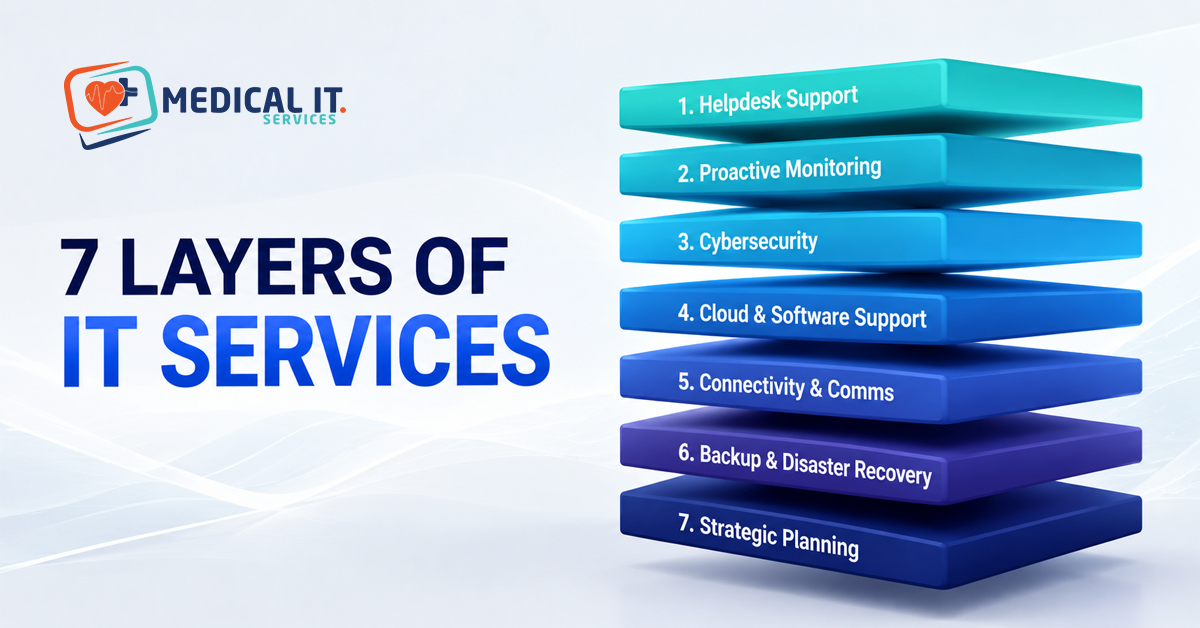
The Full Range of IT Services from Daily Helpdesk Support to Strategic Technology Planning
Most medical practices think about IT services the way they think about a fire extinguisher: something you call on when things go wrong. That’s genuinely half the picture. The other half is proactive monitoring, security, cloud strategy, and long-term technology planning. What determines how often you need the fire extinguisher in the first place? Whether your practice’s technology is helping you grow or quietly holding you back.
This article walks through the full range of IT services a medical practice genuinely needs. From proactive management most practices are missing to strategic technology planning. Almost none have, and it explains why these layers work best as one connected relationship. Rather than a collection of separate purchases.
The Spectrum, briefly
Before diving into each layer, it’s helpful to see the full spectrum in one place. This is often the structure IT providers don’t lay out clearly for clients.
| Layer | What It Does | When It Matters Most |
| 1. Helpdesk Support | Fixes problems after they occur | Every practice, at minimum |
| 2. Proactive Monitoring | Catch problems before they occur | As soon as downtime has a real cost |
| 3. Cybersecurity | Protects against threats and breaches | From day one, given healthcare data sensitivity |
| 4. Cloud & Software Support | Manages practice management platforms | Any practice on cloud-based systems |
| 5. Connectivity & Comms | Keeps internet, phones, and telehealth reliable | As soon as patient-facing systems depend on them |
| 6. Backup & Disaster Recovery | Restores operations after a major incident | Every practice, scaled to risk profile |
| 7. Strategic Planning | Aligns technology with business growth | Multi-doctor practices and healthcare groups especially |
Layer One: Daily Helpdesk Support
This is the layer every practice already has some version of: the ability to call or email someone when a printer won’t print, a password’s been forgotten, or a workstation is behaving strangely. Good helpdesk support means fast acknowledgment, a genuine attempt at remote diagnosis before defaulting to an on-site visit, and clear communication about what’s happening and when it’ll be fixed. Our companion article on how IT support keeps a medical practice running covers this layer in much greater technical depth, including how ticket triage and escalation work.
Helpdesk support alone, though, is inherently reactive. It’s valuable and necessary, but it only ever responds to problems that have already happened. A practice relying purely on this layer will always be one workstation failure or one software crash away from disruption, with no mechanism actively working to prevent that failure in the first place.
There’s also a meaningful difference in quality within this layer itself. A generalist provider’s helpdesk treats every ticket the same way, first in, first out. A healthcare-aware helpdesk triages by clinical impact; a patient record access issue jumps the queue ahead of a slow printer, every time, regardless of which was reported first. This distinction sounds small until it’s your practice’s turn to need it.
Layer Two: Proactive Monitoring and Maintenance
This is where the shift from reactive to proactive genuinely begins. Remote monitoring and management (RMM) tooling runs continuously in the background across workstations, servers, and network equipment, tracking disk health, memory usage, and early warning signs of failure. Instead of discovering a server’s hard drive is failing when it fails, mid-consultation on a busy Monday, proactive monitoring flags the warning signs weeks earlier, when a technician can schedule a replacement during a quiet period.
This layer also includes routine maintenance most practices never think about: keeping operating systems and software patched against known vulnerabilities, monitoring for unusual performance degradation, and periodically reviewing whether existing hardware is nearing end of life. The genuine value here isn’t just fewer outages; it’s outages that happen on the practice’s terms, during a scheduled maintenance window, rather than at 9 am with a full waiting room.
Network equipment benefits from a similar approach using protocols like SNMP, which let monitoring software poll switches and routers at regular intervals without a technician needing to log in manually. A switch that’s slowly overheating, a common precursor to fan failure, becomes visible as a trend over weeks rather than a surprise outage on a Tuesday morning. This is genuinely where the return on investment for proactive monitoring becomes measurable: fewer emergency call-outs, and a technician’s time spent preventing problems rather than only ever reacting to them.
Layer Three: Cybersecurity and Compliance-Aligned Protection
Medical practices hold some of the most sensitive personal data that exists and are genuinely attractive targets for cyber criminals precisely because of that. This layer covers endpoint protection with modern threat detection (our dedicated article on sandbox-based malware detection explains this in technical depth), email filtering to stop phishing before it reaches staff, multi-factor authentication, and network-level monitoring for suspicious activity.
For a healthcare business specifically, this layer also needs to connect to accreditation and compliance expectations; RACGP and NSQHS Standards both include expectations around information security that a generalist IT provider often simply isn’t aware exist. Good cybersecurity for a medical practice isn’t just generically strong; it’s specifically aligned to what your practice is assessed against.
Multi-factor authentication deserves particular emphasis here, since it’s consistently one of the single most effective controls available against credential theft, and it’s genuinely non-negotiable for any system handling patient data. A practice with strong endpoint protection but no MFA on remote access or cloud logins still has a serious, addressable gap, and it’s one of the first things worth checking regardless of what other security measures are already in place.
Layer Four: Cloud and Practice Software Support
Most modern practices run on cloud-based practice management software. Such as Best Practice Software, Medical Director, and Genie Solutions, alongside tools like HotDoc for bookings. This layer covers making sure that software runs reliably, integrates properly with other systems, and that your practice understands what it’s adopting when it takes on new cloud tools. Our detailed explainer on cloud computing services covers the technical distinction between these different cloud models in more depth.
This layer also covers the less visible work: confirming where your practice management vendor stores patient data, whether that aligns with expectations under RACGP and NSQHS Standards, and what your options are if you ever need to migrate to a different platform. This is genuinely specialist knowledge that a provider without dedicated healthcare experience is unlikely to have thought through.
It’s worth noting that being a SaaS (Software as a Service), which almost every practice already is through its practice management platform, doesn’t mean infrastructure and compliance questions disappear. It means responsibility shifts partly to the vendor, but a good IT partner still needs to understand exactly what that vendor is and isn’t responsible for and flag any gap that leaves your practice exposed.
Layer Five: Connectivity and Communications
None of the above matters if your internet connection or phone system isn’t reliable. This layer covers managed internet services, proactive router monitoring and bandwidth optimisation. That prioritises clinical software and telehealth traffic over background activity, network redundancy to remove single points of failure, and virtual phone systems configured for how a medical reception operates, including after-hours triage messaging and multi-practitioner call routing.
For a growing or multi-site practice, this layer becomes genuinely strategic rather than purely operational: consistent connectivity across every location makes troubleshooting and support far simpler than a patchwork of different providers and configurations chosen site by site.
A failover connection, typically 4G or 5G backup that activates automatically if the primary line drops, is worth specific mention here. It’s a relatively low-cost addition that prevents a single ISP outage from turning into a full day of cancelled appointments and diverted patients, and it’s exactly the kind of measure that’s easy to overlook until the day it’s genuinely needed.
Layer Six: Data Backup and Disaster Recovery
This layer covers what happens when something goes seriously wrong, such as a ransomware attack, hardware destruction, or a natural disaster affecting the practice premises. Our dedicated guide to disaster recovery planning covers this in genuine depth, including the distinction between backup, disaster recovery, and business continuity, and how Recovery Time Objective and Recovery Point Objective should be set for medical practice specifically.
The critical point worth restating here is that a backup which has never been tested isn’t really a safety net; it’s an assumption. This layer isn’t complete until recovery has been rehearsed, not just configured and left untouched.
This is also the layer most likely to be handled by a completely different vendor to your day-to-day helpdesk provider, and that separation is exactly where things go wrong. If the people managing your backups don’t understand your practice management software’s specific database structure, a restore that looks successful on paper can still leave you with corrupted or incomplete patient records. This is one of the clearest examples of why the layers genuinely need to connect rather than operate independently.
Layer Seven: Strategic Technology Planning
This is the layer almost no practice has, and it’s the one that turns IT from a cost centre into a genuine growth enabler. Strategic technology planning means having someone, often functioning as a virtual CIO. Who understands your practice’s growth trajectory and proactively plans the technology decisions that support it: when to upgrade ageing hardware before it becomes a liability, how to structure IT budgets across a financial year rather than reacting to surprise costs, and how technology choices should change as a practice adds doctors, opens a second site, or takes on more complex compliance obligations.
In practice, this looks like a quarterly or biannual review meeting, not a technical support call, where your IT provider walks through what’s coming up: a server nearing end of life, a compliance requirement on the horizon, a new clinical system worth evaluating, and helps you plan and budget for it well before it becomes urgent. This is the layer that separates an IT provider from an actual technology partner.
Why These Layers Need to Work Together
It’s entirely possible to buy these layers separately, a helpdesk contract here, a cybersecurity tool there, backup software from a third vendor, without any of them talking to each other. This is genuinely common, and it genuinely creates problems. A cybersecurity tool that isn’t integrated with your monitoring platform means a threat alert might sit unnoticed. A backup solution configured independently of your helpdesk provider means nobody who understands your day-to-day systems has verified the backup would restore them correctly.
When one provider manages the full spectrum, helpdesk through strategic planning, each layer informs the others. A pattern noticed in helpdesk tickets feeds directly into strategic planning. A new compliance requirement identified in strategic planning translates directly into a specific cybersecurity configuration change. And it implemented by the same team that already understands your environment, rather than being relayed secondhand between disconnected vendors.
Which Layers Matter Most at Practice’s Stage?
1. Solo GP or small allied health clinic
Helpdesk support, basic proactive monitoring, and cybersecurity fundamentals cover the essentials. Strategic planning can be lighter touch, an annual check-in rather than a quarterly meeting. But shouldn’t be skipped entirely, since even a small practice benefits from knowing what’s coming.
2. Multi-doctor general practice
All seven layers genuinely start to matter, given the higher stakes of downtime. The larger volume of patient data, and the growing complexity of connectivity and communications across more staff and consulting rooms. This is typically the stage where strategic planning shifts from optional to genuinely valuable.
3. Multi-site healthcare group
Strategic planning becomes essential, not optional, and consistency across every layer- monitoring standards, security configuration, connectivity setup. At every site is what keeps a growing group manageable rather than a patchwork of independently configured locations.
Conclusion
IT services for a medical practice aren’t one thing; they’re a spectrum running from daily reactive helpdesk support. Through to genuine strategic technology planning, and most practices are only using the bottom rungs of that ladder without realising how much value sits above them. The practices getting the most from their technology aren’t necessarily spending the most. They’re the ones whose IT provider treats these seven layers as one connected relationship rather than a menu of separate purchases.
If your practice currently has helpdesk support but nothing above it. Medical IT Services can review your current setup and show you exactly where the gaps are and what closing them would look like.
Related Posts